EPFO UMANG App 2026: UAN Activation, Passbook & PF Claim
EPFO UMANG is the EPFO service section inside UMANG, the Government of India’s official app for central and state services. It lets you manage your PF account from your phone: activate your UAN, check your EPF passbook, file a withdrawal claim, track it and update KYC, often in a few taps.
In 2026 UMANG became essential, not optional. After the July 2026 portal upgrade, EPFO moved UAN activation and new UAN generation off its website and onto UMANG, where you verify yourself with Aadhaar face authentication. If you are a first-time user, UMANG is now the only way in. This guide walks you through every EPFO service on UMANG, step by step.
What Is EPFO on the UMANG App?
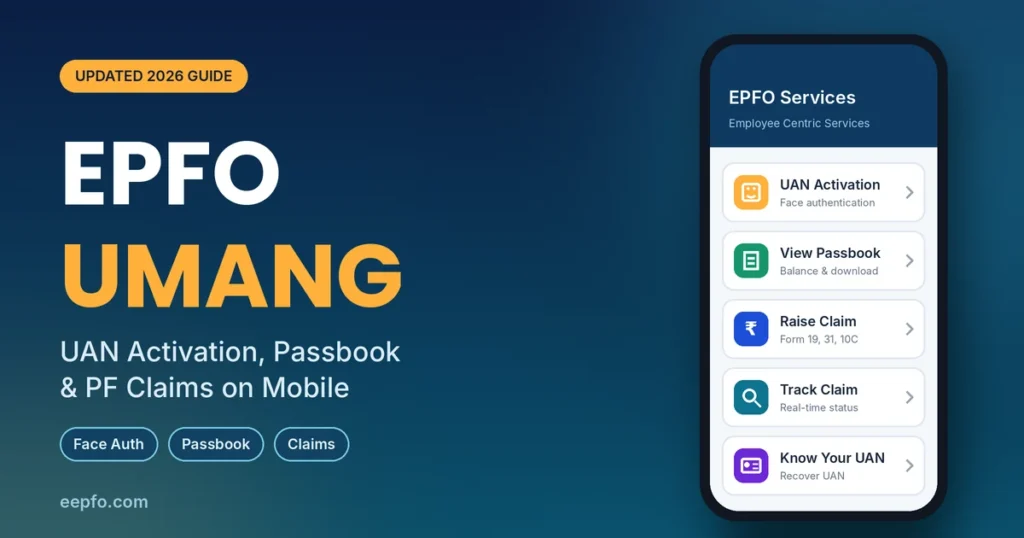
UMANG (Unified Mobile Application for New-age Governance) brings hundreds of government services into one app. EPFO is one of its most used departments. Inside UMANG, EPFO services are grouped into three areas:
| Section | Main services |
|---|---|
| UAN Services Through Face Auth | UAN Allotment and Activation, UAN Activation, Face Authentication of Already Activated UANs |
| Employee Centric Services | View Passbook, Raise Claim, Track Claim, Know Your UAN, transfer request |
| e-KYC and Pensioner Services | Aadhaar seeding, PPO download, pension enquiry |
The EPFO website still handles some tasks better, such as e-Nomination and bank or PAN KYC. Most people use both: UMANG for quick checks, the website for paperwork-style updates. If you need the web steps, see our EPFO login guide.
How to Set Up UMANG for EPFO Services
What you need: an Android or iPhone with a front camera, your Aadhaar-linked mobile number, your Aadhaar number, and your UAN if you already have one.
- Install two apps: UMANG and AadhaarFaceRD (the UIDAI face scanning app) from the Play Store or App Store. You can also give a missed call to 9718397183 to get the UMANG download link by SMS.
- Register: open UMANG, enter your mobile number and verify the OTP.
- Set an MPIN: create a 4-digit MPIN. You will use it to open the app from now on.
- Find EPFO: type EPFO in the search bar and tap the EPFO department.
Tip: download only from the official app stores. Fake “EPFO” apps exist that try to steal OTPs and bank details. The genuine app is published by the National e-Governance Division (NeGD).
UAN Services Through Face Authentication on UMANG
This section has three options. Pick the one that matches your situation.
| Your situation | Option to choose |
|---|---|
| New employee with no UAN | UAN Allotment and Activation |
| You have a UAN but never activated it | UAN Activation |
| Your UAN is active, but you want to verify your face and update records | Face Authentication of Already Activated UANs |
How to Activate Your UAN on EPFO UMANG
- Open EPFO in UMANG and scroll to UAN Services Through Face Auth.
- Tap UAN Activation.
- Enter your UAN, Aadhaar number and Aadhaar-linked mobile number. Tick the consent box and tap Send OTP.
- Enter the OTP. UMANG opens the AadhaarFaceRD app.
- Sit in good, even light, remove glasses or a mask, and look straight at the camera. Hold still until you see a green circle.
- Review your name and date of birth, then tap Submit.
Your UAN is now active. EPFO sends your UAN and a temporary password by SMS, and updates your record with your Aadhaar photo and address. Use that password for your first login on the EPFO member portal, where you will be asked to set a new one.
How to Generate a New UAN on UMANG
New joiners whose employer has not yet allotted a UAN can create one themselves:
- Tap UAN Allotment and Activation.
- Enter your Aadhaar and mobile number, give consent and verify the OTP.
- The system checks whether your Aadhaar already has a UAN. If not, complete the face scan.
- Your new UAN is generated, activated and sent to your mobile.
Share the UAN with your employer so they can link your PF account to it. If the app says a UAN already exists, do not create another; use Know Your UAN instead (explained below). Two UANs cause transfer and claim problems later.
How to Check Your EPF Passbook on UMANG
- Open EPFO > Employee Centric Services > View Passbook.
- Enter your UAN and tap Get OTP. Enter the OTP from your registered mobile.
- Pick the Member ID you want. Each past or current employer has its own Member ID.
- Your balance appears, split into employee share, employer share and pension (EPS) contribution.
- Tap Download to save the passbook as a PDF.
If you activated your UAN today, wait a few hours before the passbook shows up. For more ways to check your balance, read our EPF passbook guide.
How to Withdraw PF on UMANG (Raise Claim)
Your UAN must be active, with Aadhaar, PAN and bank account verified in KYC.
- Go to EPFO > Employee Centric Services > Raise Claim.
- Enter your UAN and the OTP sent to your Aadhaar-linked mobile.
- Choose the form that fits:
- Form 31 for a partial withdrawal while employed (illness, education, marriage, housing)
- Form 19 for final PF settlement
- Form 10C for pension withdrawal when service is under 10 years
- Form 10D for monthly pension
- Select the purpose and amount if asked, and confirm your bank details.
- Submit. You will get an SMS with the claim reference.
The money is paid only to the bank account in your KYC. Under the EPF Scheme 2026, partial withdrawals need at least 12 months of membership, and 25% of your contributions must stay in the account.
How to Track EPF Claim Status on UMANG
- Open EPFO > Employee Centric Services > Track Claim.
- Enter your UAN and the OTP.
- Tap a claim to see its tracking ID, form type and current status.
“Settled” means the money has been sent to your bank. If a claim is rejected, the reason appears on screen; fix it and apply again. EPFO must settle a complete claim within 20 days, so raise a grievance if yours takes longer.
Other Useful EPFO Services on UMANG
- Know Your UAN: forgot your UAN? Enter your mobile number, verify the OTP, then search using Aadhaar, PAN or your old Member ID. Your UAN appears on screen and by SMS.
- Aadhaar seeding: under e-KYC Services, link Aadhaar to your UAN with two OTPs. Updates usually reflect within a day.
- Transfer request: move PF from an old employer to your current account. The EPFO website’s One Member One EPF Account option is often more reliable.
- Grievance: raise a complaint with EPFO from inside the app.
- EPFO office locator: find the regional office handling your account.
EPFO Pensioner Services on UMANG
Pensioners under EPS 1995 can use Pensioner Services in the EPFO section to view their pension passbook and download the Pension Payment Order (PPO) with their PPO number, date of birth and an OTP. The PPO download may not show for every user; if it is missing, use DigiLocker or the EPFO website. Life certificates can be submitted digitally through Jeevan Pramaan.
EPFO UMANG vs EPFO Member Portal
| Task | UMANG app | EPFO website |
|---|---|---|
| UAN activation / new UAN | Yes (only here) | No |
| PF passbook and balance | Yes | Yes |
| Raise withdrawal claim | Yes | Yes |
| Track claim | Yes | Yes |
| Bank and PAN KYC | Limited | Yes (recommended) |
| e-Nomination | Limited | Yes (recommended) |
| PF transfer | Yes | Yes (more reliable) |
| Death claim by nominee | No | Yes |
| Login method | MPIN plus OTP | UAN, password and captcha |
Use UMANG for speed and the website for detailed account changes.
Common EPFO UMANG Problems and Fixes
| Problem | Fix |
|---|---|
| Face authentication fails | Use bright, even light; remove glasses; update AadhaarFaceRD; try again later |
| OTP not received | Check that the number is linked to Aadhaar and EPFO; wait two minutes before resending |
| “UAN already exists” | Don’t create a new UAN; use Know Your UAN to find the existing one |
| Details don’t match Aadhaar | Correct name, date of birth or gender on the EPFO website with employer approval |
| Passbook or service not loading | Update the app, clear its cache, or try outside office hours |
| EPFO service temporarily unavailable | EPFO runs maintenance at times; retry later or use the website |
If a problem continues, file a complaint on EPFiGMS or call the EPFO toll-free helpline 1800-118-005.
FAQs
Is the UMANG app safe for EPFO services?
Yes. UMANG is the Government of India’s official app, built by the National e-Governance Division. Install it only from the Play Store or App Store, and never share your MPIN or OTP.
Can I activate my UAN without UMANG?
Not anymore. Since July 2026, UAN activation and new UAN allotment are available only on UMANG with Aadhaar face authentication.
Do I need a password to use EPFO on UMANG?
No. You open UMANG with your MPIN, and each EPFO service is verified with an OTP sent to your registered mobile.
Why does face authentication keep failing?
Poor lighting, glasses, an outdated AadhaarFaceRD app or an old Aadhaar photo are the usual causes. Retry in daylight. If your Aadhaar photo is very old, update it at an Aadhaar centre.
Can I withdraw full PF on UMANG?
Yes, if you qualify for final settlement. File Form 19 under Raise Claim. While still employed, only partial withdrawal through Form 31 is allowed.
Is UMANG free?
Yes. UMANG and every EPFO service in it are free. Anyone charging a fee to process your claim is not from EPFO.
Conclusion
EPFO UMANG has gone from a handy extra to a must-have. It is now the only place to activate or generate a UAN, and it remains the quickest way to check your passbook, file a claim and track it on your phone. Set it up once with your Aadhaar-linked number, keep AadhaarFaceRD installed, and use the EPFO website for KYC and nomination.